

 DIRECT TOP-UP

 CARD
CARDBIGO LIVE Diamonds Recharge Guide 2026: How to Top Up Safely
BIGO LIVE has become a major live-streaming and social platform where viewers can watch live broadcasts, interact with creators, join live rooms, and support their favorite streamers through virtual gifts. BIGO LIVE describes itself as a live-streaming platform with live video, gaming, shows, and video chat features.
For viewers who regularly support creators, BIGO LIVE Diamonds recharge is one of the most useful features on the platform. Diamonds are the virtual currency used to purchase gifts and participate in supported live-streaming interactions.
If you are looking for a convenient way to recharge BIGO LIVE Diamonds, this guide explains how the currency works, how to choose the right recharge amount, and what to check before completing a purchase.
What Are BIGO LIVE Diamonds?
BIGO LIVE Diamonds are the virtual currency purchased by viewers on the platform.
The main purpose of Diamonds is to purchase virtual gifts that can be sent to broadcasters during live streams. BIGO's own explanation of its creator economy describes the process clearly: viewers purchase Diamonds, use them to send gifts, and creators receive those gifts as Beans in their broadcaster wallet.
This means Diamonds are primarily designed for the viewer side of the BIGO LIVE ecosystem.
The basic flow is:
Recharge Diamonds → Watch a live stream → Send virtual gifts → Support creators
What Can You Do With BIGO LIVE Diamonds?
The most common use for Diamonds is sending virtual gifts.
Send Gifts to Streamers
During a live broadcast, viewers can open the gift panel and select available virtual gifts.
BIGO's official guide explains that viewers can purchase Diamond packs through the Recharge function and then use Diamonds to send gifts during a live broadcast.
Support Your Favorite Creators
Virtual gifts provide viewers with a direct way to support broadcasters they enjoy.
For creators, gifts received during streams are converted into Beans according to BIGO LIVE's creator economy system.
Participate in Live Events
Depending on the current event or live-streaming feature, Diamonds may also be used for special interactions and activities within BIGO LIVE.
Because BIGO regularly introduces new events and features, available gift types and activities can change.
How to Recharge BIGO LIVE Diamonds
The recharge process is generally straightforward, but users should pay close attention to their BIGO ID and the selected Diamond package.
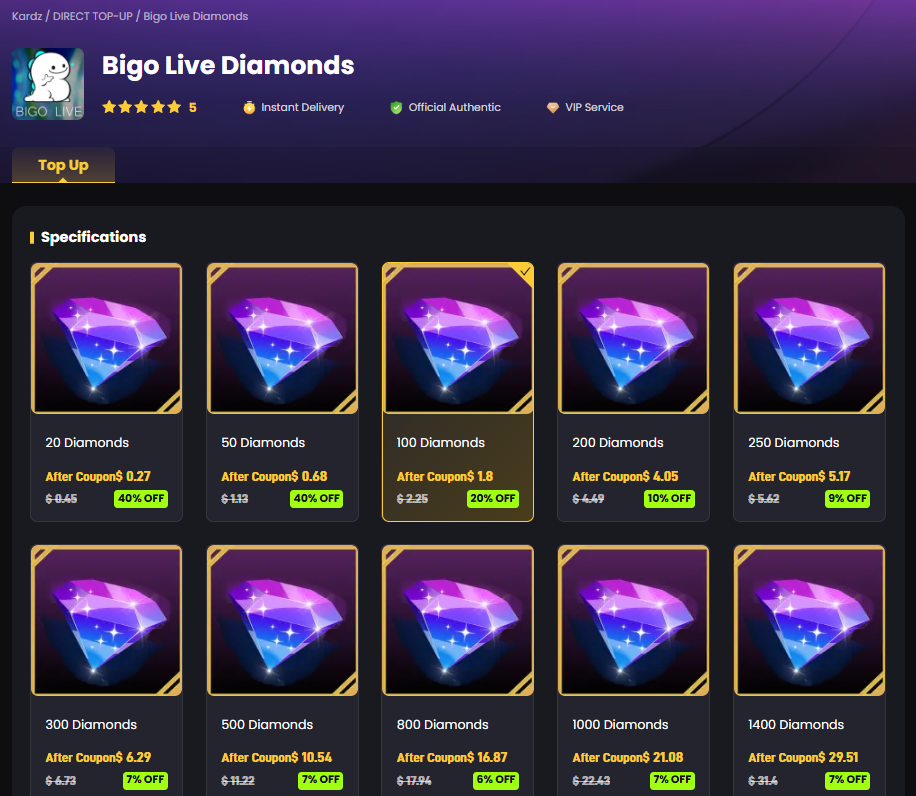
Step 1: Choose a BIGO LIVE Diamond Package
Start by selecting the number of Diamonds you want to purchase.
Choose an amount based on how frequently you watch live streams and how much you intend to spend on virtual gifts.
A smaller package can be suitable for occasional gifting, while regular viewers may prefer a larger recharge amount.
Step 2: Enter Your BIGO Account Information
Depending on the recharge method, you may need to provide your BIGO ID or other account information.
Always verify the account details before completing the order.
A simple mistake in the account identifier can delay delivery or send the recharge to the wrong account.
Step 3: Select a Payment Method
Choose an available payment method and review the final amount before payment.
BIGO's official recharge ecosystem supports multiple payment options depending on the user's location. Its official recharge pages promote methods such as PayPal, bank payment, and wallet-based payment options in supported markets.
Step 4: Complete the Payment
Confirm your Diamond package and payment details, then complete the transaction.
Avoid refreshing the page repeatedly while a payment is being processed.
Step 5: Check Your BIGO LIVE Balance
After the recharge has been completed, open BIGO LIVE and check your Diamond balance.
You can then use the Diamonds to send gifts during supported live streams.
BIGO LIVE Diamonds vs. Beans
One of the most important things to understand about BIGO LIVE is the difference between Diamonds and Beans.
They are used by different sides of the platform.
Diamonds are purchased by viewers.
Beans are received by broadcasters through gifts and can be converted according to BIGO LIVE's creator payment system. BIGO's official explanation describes the cycle as viewers buying Diamonds, sending gifts, creators receiving Beans, and creators eventually cashing out according to platform requirements.
So:
Diamonds are for viewers. Beans are for creators.
This distinction is important when searching for BIGO LIVE recharge services.
A viewer looking to send gifts should search for BIGO LIVE Diamonds recharge, not Beans.
How Much Should You Recharge?
There is no universal amount that works for every BIGO LIVE user.
The best choice depends on how often you watch live streams and how frequently you send gifts.
Occasional Viewers
A smaller recharge amount is usually enough for users who only send gifts occasionally.
Regular Viewers
If you frequently watch the same streamers and regularly participate in live interactions, a larger Diamond balance can reduce the need for repeated purchases.
Heavy Gift Senders
Users who regularly participate in live events or send larger gifts may prefer higher-value recharge packages.
However, it is better to choose a package based on your actual spending needs instead of simply selecting the largest available denomination.
BIGO LIVE Recharge for Overseas Users
International users may encounter payment limitations when trying to recharge directly through an app or regional payment method.
BIGO provides an official online recharge ecosystem, and its official recharge pages promote direct Diamond purchases and multiple payment methods. The official site also warns users that m.bigopay.tv is the designated official BIGO LIVE Diamond acquisition URL.
This is particularly useful for users who want to check whether a payment option is legitimate before purchasing.
When using a third-party recharge service, always verify:
The recharge is intended for BIGO LIVE.
The correct account or BIGO ID is required.
The Diamond amount is clearly displayed.
The payment amount is shown before checkout.
No unnecessary account password is requested.
How to Choose a Safe BIGO LIVE Recharge Service
Searching for BIGO LIVE Diamonds Recharge can produce many different websites, so it is important to evaluate a provider carefully.
Check the Product Details
Make sure the page clearly explains:
Diamond quantity
Recharge method
Required account information
Estimated processing time
Payment options
Refund or support policy
Verify Your BIGO ID
Always double-check your BIGO ID before payment.
This is especially important for direct top-up services because the recharge is associated with a specific account.
Do Not Share Your Password
A normal direct Diamond recharge should not require you to hand over unnecessary login credentials.
Never provide your password or authentication codes to an unknown seller.
Compare the Final Price
Do not judge a recharge service only by the headline discount.
Check the final checkout price and the actual number of Diamonds you will receive.
BIGO LIVE Diamonds and Virtual Gifts
Virtual gifting is one of the central features of BIGO LIVE.
During a live stream, viewers can select different gifts and send them to the broadcaster. BIGO's official content explains that Diamonds are purchased by viewers specifically for this type of interaction.
The gifting ecosystem creates a direct connection between viewers and creators.
For viewers, it is a way to show appreciation.
For broadcasters, gifts contribute to their creator earnings through the platform's Beans system.
BIGO LIVE Recharge and Current Events
BIGO LIVE continues to introduce new live-streaming activities and community events.
The current BIGO LIVE ecosystem includes competitions, agency activities, creator events, and other interactive features. The official BIGO LIVE app listing currently highlights events such as Dino Card Quest and Agency Glory Tournament, where users can participate in activities and earn rewards.
Because event formats can change, users should check the latest event information inside BIGO LIVE before purchasing a large amount of Diamonds for a particular activity.
Common BIGO LIVE Recharge Mistakes
Several simple mistakes can make a recharge experience more difficult.
Choosing the Wrong Account
Always confirm the BIGO ID before submitting your order.
Confusing Diamonds and Beans
Diamonds are the viewer-side currency used for purchases and gifts, while Beans are associated with creator earnings.
Ignoring Regional Restrictions
Payment methods and available recharge options can vary by region.
Buying More Than You Need
A large Diamond package is not automatically the best value if you do not intend to use the balance.
Using Unverified Recharge Links
Be careful with links shared through unofficial messages or social media accounts. BIGO itself identifies its official recharge channel, so users should verify the destination before paying.
Recharge BIGO LIVE Diamonds with Kardz
For users searching for a convenient BIGO LIVE Diamonds recharge, Kardz provides a dedicated BIGO LIVE recharge page.
The goal is simple:
Choose your Diamonds → Enter your account information → Pay → Receive your recharge → Send gifts
Before completing an order, make sure the selected Diamond package and BIGO account information are correct.
Recharge BIGO LIVE Diamonds on Kardz
FAQ
What are BIGO LIVE Diamonds?
Diamonds are the virtual currency purchased by viewers on BIGO LIVE and used for supported purchases and virtual gifts.
What are BIGO LIVE Diamonds used for?
The main use of Diamonds is purchasing virtual gifts that viewers can send to broadcasters during live streams.
What is the difference between Diamonds and Beans?
Diamonds are purchased and used by viewers, while Beans are received by broadcasters through gifts and are part of BIGO LIVE's creator earning system.
Can I recharge BIGO LIVE from outside my country?
Availability depends on the account region and payment method. BIGO provides online recharge options with different payment methods for supported markets.
Do I need my BIGO LIVE password for a recharge?
A direct top-up normally requires account-related information rather than unnecessary password sharing. Always follow the specific requirements shown by the recharge provider.
Where should I recharge BIGO LIVE Diamonds?
BIGO identifies its official Diamond acquisition channel on its recharge pages. When using a third-party service, carefully verify the product, account information, payment details, and provider before purchasing.


.3889d0fc-74ac50710b044340bd44dab8a52423fc-3586d75109ce407d9e379eb27e699030.png?x-oss-process=image/resize,m_fill,h_160,w_120/format,webp)



-2a715a59b9ac4d34bbed497d36983382.png?x-oss-process=image/resize,m_fill,h_160,w_120/format,webp)