

 DIRECT TOP-UP

 CARD
CARDLimbus Company Lunacy Top Up Guide 2026: How to Buy and Recharge on Kardz

Looking to buy Limbus Company Lunacy or a Season Pass without going through Google Play or the App Store? Kardz offers Limbus Company Lunacy top-up packages and Season Pass purchases for the global mobile version, with delivery typically within 15 minutes.
Buy Limbus Company Lunacy on Kardz →
What Is Lunacy and What Does It Do
Lunacy is Limbus Company's paid premium currency. It's used for two things: pulling on limited Identity and EGO banners, and purchasing the Season Pass.
The game also has a free currency called Enkephalin, earned through daily tasks and story stages, which works for the standard pull pool. But limited Identities and limited EGO banners require Lunacy — there's no free alternative for that part of the game.
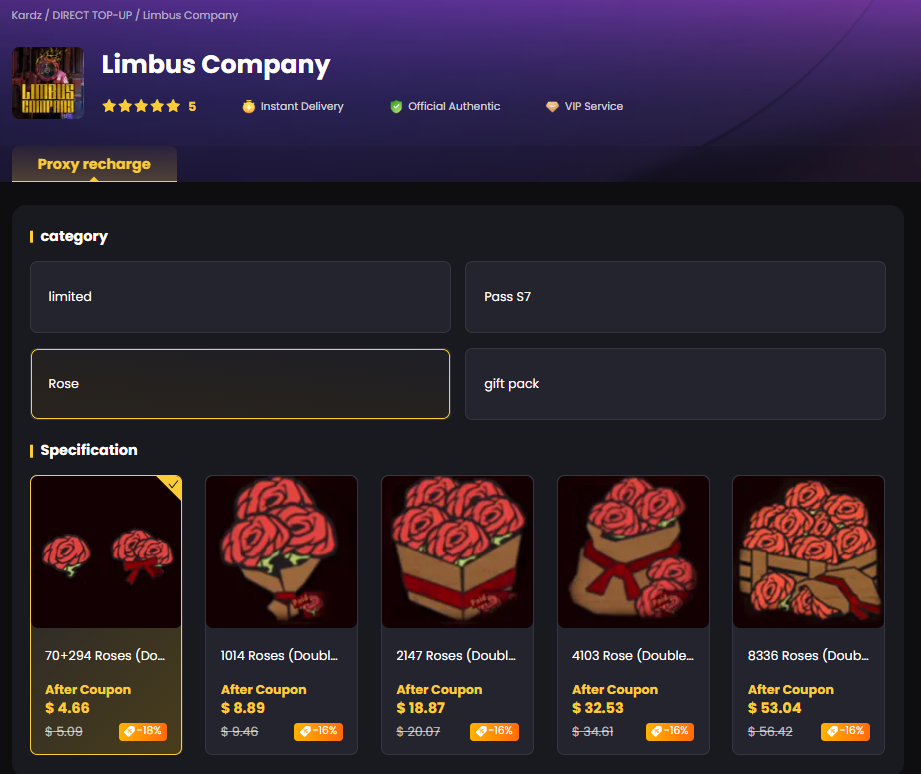
What You Can Buy Through Kardz
Kardz offers Limbus Company Lunacy top-up packages and Season Pass purchases for the international server, available on both Android and iOS.
Buy Limbus Company Lunacy packages across multiple denominations depending on how many pulls you need. If the current Season Pass is active, it's available on the same page as a separate purchase.
Everything on this page is for the global mobile version only — international server, mobile app.
Before You Order: What to Prepare
Limbus Company top-ups on Kardz use Login Top-Up, meaning Kardz support logs into your account to complete the in-app purchase on your behalf.
For this to work, your account needs to support direct login with an account ID and password — not just a social login button.
Google account users: Accounts signed in with Google may require additional verification codes during the Login Top-Up process. This is part of Google's account protection system and is expected behavior, not a payment issue. Contact Kardz support before placing your order so the verification process can be handled more smoothly and without delay.
After placing your order, stay available — support may need you to respond to a verification step during processing.
How to Complete Your Limbus Company Recharge on Kardz
Step 1 — Open the Kardz Limbus Company page and select the Lunacy package or Season Pass you want to buy.
Step 2 — At checkout, enter your account credentials and character name.
Step 3 — Complete payment. Kardz supports Visa, MasterCard, PayPal, and local payment methods across multiple regions.
Step 4 — Log out of Limbus Company on all devices after paying. Do not log back in until you receive confirmation — being active in the app during the process can interrupt delivery.
Step 5 — Most Limbus Company top-up orders are completed within 15 minutes. Kardz support will notify you when it's done.
Step 6 — Log back in, confirm your Lunacy balance, then change your account password immediately.
Changing your password after a Login Top-Up is not optional. Your credentials are used only during the top-up process, but updating them right after is the standard step for keeping your account secure.
Why Use Kardz to Buy Limbus Company Lunacy
Buying Limbus Company Lunacy through Kardz is cheaper than going through Google Play or the App Store at standard regional pricing. New Kardz accounts can also apply a first-order coupon on top of existing discounts.
Payment options include Visa, MasterCard, PayPal, and local payment methods — useful for players in regions where direct in-app purchases through Google Play or the App Store aren't straightforward.
Customer support is available daily from 9:30 to midnight. If anything goes wrong with your Limbus Company recharge, you're talking to a person, not waiting on a ticket queue.
Common Issues
No Lunacy after 15 minutes: Make sure you're fully logged out of the game on every device. Being logged in during processing is the most common reason for delays. If you're logged out and it's still not through, contact support with your order number.
Google account verification: If your account is Google-linked, support will reach out during the process for a verification code. Respond quickly to avoid the code expiring and causing a delay.
Wrong package selected: Contact support immediately after placing the order. As long as Lunacy hasn't been credited yet, there's room to adjust. Once it's in your account, the order is final.
Need a receipt: Request this before submitting the order by contacting customer service in advance. It can't be added after the fact.
FAQ
Can I top up Limbus Company without Google Play?
Yes. Kardz handles Limbus Company Lunacy top-ups independently of Google Play and the App Store. You don't need a Google Play balance or payment method linked to your store account.
Does Kardz support iOS for Limbus Company top-up?
Yes. The Limbus Company Lunacy top-up service on Kardz covers both Android and iOS users on the global server.
Can I use a guest account for top-up?
No. Guest accounts don't have a linked email or password, which means Kardz support can't log in to complete the purchase. You need a registered account with proper credentials before placing an order.
Do I need to uninstall the game during the top-up?
No. You just need to log out of the app and stay logged out until the top-up is confirmed. Uninstalling isn't necessary.
Is it safe to give my account details to Kardz?
Your credentials are used only during the Login Top-Up process to complete the in-app purchase. They're not stored or shared beyond that. Changing your password immediately after the top-up is confirmed is the recommended step — it takes about 30 seconds and closes the loop on account security.
What's the difference between Lunacy and Enkephalin?
Enkephalin is the free currency earned through daily tasks and story content, usable in the standard pull pool. Lunacy is the paid currency required for limited Identity and EGO banners and the Season Pass. They can't be exchanged for each other.
Can I buy the Limbus Company Season Pass on Kardz?
Yes. The Season Pass is listed alongside Lunacy packages on the Kardz Limbus Company page. Select it the same way you would a Lunacy pack.
How long does a Limbus Company top-up take on Kardz?
Most orders are completed within 15 minutes. Google account orders may take slightly longer due to the verification step. If it goes past 30 minutes, contact support with your order number.
Buy Limbus Company Lunacy on Kardz →



.3889d0fc-74ac50710b044340bd44dab8a52423fc-3586d75109ce407d9e379eb27e699030.png?x-oss-process=image/resize,m_fill,h_160,w_120/format,webp)





-2a715a59b9ac4d34bbed497d36983382.png?x-oss-process=image/resize,m_fill,h_160,w_120/format,webp)