

 DIRECT TOP-UP

 CARD
CARDFree Fire Diamonds Top Up Guide: How to Recharge Safely in 2026

Free Fire remains one of the most popular mobile battle royale games, with short matches, fast-paced combat, multiple game modes, and a large collection of characters, pets, weapon skins, and other cosmetic items. Garena describes Free Fire as a mobile-first battle royale designed around short matches and accessible gameplay, while Free Fire MAX provides a more enhanced visual experience and supports cross-play with Free Fire through Firelink.
For players who want to unlock premium content, Free Fire Diamonds Top Up is one of the most convenient ways to add Diamonds to a game account.
With ongoing game updates, special events, collaborations, and limited-time content, knowing how to recharge Diamonds correctly can help players avoid common top-up mistakes.
What Are Free Fire Diamonds?
Diamonds are the premium in-game currency used in Free Fire.
Unlike the regular resources earned during gameplay, Diamonds are primarily used for premium and cosmetic content. Depending on the current game events and store availability, players may use Diamonds for items such as character cosmetics, outfits, weapon skins, pets, Lucky Royale entries, and other special content.
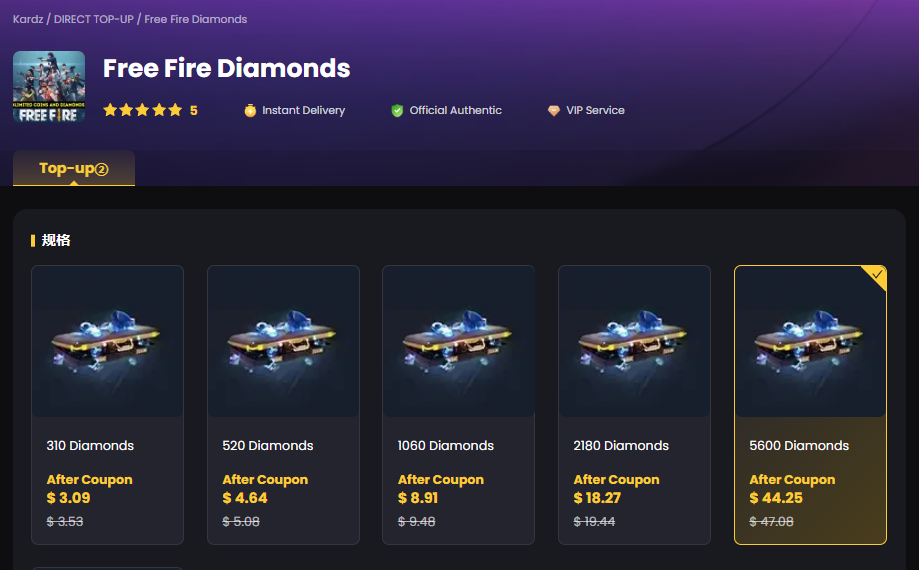
Kardz currently offers multiple Free Fire Diamonds packages, including 310, 520, 1,060, 2,180, 5,600, and 11,500 Diamonds on its international Free Fire top-up page.
The available package and final price can change according to promotions and product updates, so players should always check the current options before completing an order.
Why Do Players Buy Free Fire Diamonds?
Free Fire's premium content changes regularly through updates, events, collaborations, and seasonal activities.
Garena's official news page has featured major Free Fire announcements throughout 2026, including the game's ninth-anniversary celebration, the OB54 update, football-themed events, collaborations, and the upcoming Free Fire: Daybreak anime project.
Limited-time events can make Diamonds particularly useful for players who want to participate in premium activities or collect exclusive cosmetic items.
Some common uses include:
Premium Outfits
Players can use Diamonds to obtain premium character outfits and other customization items available through the current game store or events.
Weapon Skins
Weapon skins are another major part of Free Fire's cosmetic ecosystem. Some events and draws offer special weapon appearances and related rewards.
Lucky Royale and Special Events
Diamonds can also be used in selected Lucky Royale and other event-based systems to obtain randomized or limited rewards.
Limited-Time Content
Free Fire frequently introduces collaborations and seasonal campaigns. Popular content can be available only for a limited period, making it important to check event dates before purchasing Diamonds.
How to Top Up Free Fire Diamonds
The top-up process is straightforward when using a supported recharge method.
Step 1: Choose Your Diamond Package
Select the amount of Free Fire Diamonds you want to purchase.
For example, the Kardz Free Fire page currently provides several Diamond denominations, allowing players to choose a package based on their needs and budget.
Step 2: Enter Your Player ID
After selecting the package, enter the correct Free Fire Player ID required for the recharge.
This is one of the most important steps in the process. Always double-check the ID before making payment.
Kardz's current Free Fire top-up instructions specifically use the player's ID as part of the recharge process.
Step 3: Select a Payment Method
Review the available payment options and select the method that works best for you.
Kardz currently lists payment support including Visa, Mastercard, PayPal, and other supported methods on its Free Fire page.
Step 4: Complete the Payment
After confirming the package, account information, and payment details, complete your transaction.
Step 5: Check Your Free Fire Account
Once the transaction has been processed, the purchased Diamonds should be credited to the selected Free Fire account according to the top-up method.
Kardz states that its Free Fire top-ups are generally completed within 10–30 minutes, although processing time can vary.
Free Fire and Free Fire MAX: What Should Players Know?
Free Fire and Free Fire MAX belong to the same broader game ecosystem, but they are designed with different hardware and visual experiences in mind.
Garena describes Free Fire MAX as a version designed to provide a more premium battle royale experience, with higher-quality visuals while maintaining compatibility with Free Fire players through Firelink technology.
This means players should pay attention to the server, region, and account information when purchasing Diamonds.
Before completing a top-up, make sure the selected product is compatible with your account.
How to Choose the Right Free Fire Diamonds Package
There is no single best Diamond package for every player.
A smaller package can be suitable when you only need enough Diamonds for a specific event or item.
A larger package may make more sense for players who regularly participate in premium events or purchase cosmetic content.
The important thing is to choose based on your actual spending needs rather than automatically selecting the largest package.
For example:
Small top-up: suitable for a specific purchase or limited event.
Medium top-up: useful for several cosmetic purchases.
Large top-up: better suited to players who regularly purchase premium content.
Kardz currently provides multiple package sizes so players can select the amount that fits their needs.
Tips for a Safe Free Fire Diamonds Top Up
Before purchasing Diamonds, there are several things worth checking.
Confirm Your Player ID
Entering the wrong Player ID can cause problems with the recharge. Always verify your information before payment.
Check Your Region
Free Fire products and payment systems can differ between regions. Make sure you are purchasing a product intended for your account.
Check the Package Carefully
Review the Diamond quantity, original price, discounted price, and any active promotion before placing your order.
Avoid Unofficial Diamond Offers
Be careful with websites or individuals promising unrealistic Diamond discounts, free Diamonds, or account-related services that require unnecessary credentials.
A legitimate top-up should clearly explain what information is required and how the recharge is delivered.
Keep Your Account Credentials Private
A normal player-ID based top-up should not require you to hand over unnecessary account credentials. Never share passwords or authentication codes with an unknown seller.
Can You Get Free Free Fire Diamonds?
Players often search for free Free Fire Diamonds, especially around major events and collaborations.
Garena periodically runs special campaigns, promotions, and events that can provide rewards. Its official Free Fire news channels are the best place to check current event information and promotional opportunities.
However, players should be cautious about websites claiming to generate unlimited free Diamonds.
There is no reason to provide your password, verification code, or other sensitive account information to a site promising instant free Diamonds.
For players who need Diamonds immediately, a legitimate top-up is generally a more straightforward option.
Free Fire Continues to Expand in 2026
Free Fire's content ecosystem continues to develop through new updates, collaborations, competitions, and community events.
Garena's official announcements show that 2026 has included the OB54 update, the ninth-anniversary celebration, multiple themed campaigns, and major collaborations.
More recently, on September 3, 2026, Garena announced that Free Fire won the Best Use of IP or Licence award at the Pocket Gamer Mobile Games Awards 2026 for its NARUTO SHIPPUDEN Chapter 2: Ninja War collaboration.
For players following Free Fire's newest content, this continued activity means there are regular reasons to check the game's current events and available premium items.
Top Up Free Fire Diamonds with Kardz
If you are looking for a convenient Free Fire Diamonds Top Up, Kardz provides a dedicated Free Fire recharge page with multiple Diamond packages.
The current process is simple:
Choose Diamonds → Enter Player ID → Select Payment → Complete Payment → Receive Diamonds
The dedicated Kardz Free Fire page currently offers multiple Diamond denominations and provides instructions for completing an international-server top-up.
Ready to recharge your Free Fire account?
Top Up Free Fire Diamonds on Kardz
FAQ
How do I top up Free Fire Diamonds?
Choose a Diamond package, enter your Free Fire Player ID, select a payment method, and complete the payment. The Diamonds are then credited according to the selected top-up method.
How long does a Free Fire Diamonds top-up take?
Kardz states that Free Fire top-ups are usually completed within 10–30 minutes, although actual processing time may vary.
What can Free Fire Diamonds be used for?
Diamonds can be used for various premium and cosmetic content, including selected outfits, weapon skins, pets, Lucky Royale activities, and event-related items.
Do I need my Free Fire password to top up?
The Kardz Free Fire top-up process is based on entering your Player ID rather than providing your account password.
Is Free Fire MAX the same as Free Fire?
Free Fire MAX is a visually enhanced version of Free Fire, and Garena supports interaction between the two through Firelink technology.


.3889d0fc-74ac50710b044340bd44dab8a52423fc-3586d75109ce407d9e379eb27e699030.png?x-oss-process=image/resize,m_fill,h_160,w_120/format,webp)




-2a715a59b9ac4d34bbed497d36983382.png?x-oss-process=image/resize,m_fill,h_160,w_120/format,webp)