

 DIRECT TOP-UP

 CARD
CARDHow to Recharge Genshin Impact in 2026
Recharging Genshin Impact means buying Genesis Crystals — the game's paid premium currency — and converting them into Primogems for banner pulls.
If you've never done it before, the process takes about two minutes once you know what information you need. This guide is part of our complete Genshin Impact Top Up series — if you're looking for a price comparison or want to know why Kardz is cheaper than the official store, start there first.
If you've done it before but ran into issues — wrong server, crystals not arriving, payment failing — the troubleshooting section at the bottom covers all of that.
What You're Actually Buying
When people say "recharge Genshin," they mean buying Genesis Crystals.
Genesis Crystals convert to Primogems at 1:1. Primogems buy Intertwined Fates (for limited banners) or Acquaint Fates (for standard banner) at 160 Primogems each.
The conversion chain is:
Real money → Genesis Crystals → Primogems → Fates → Banner pulls
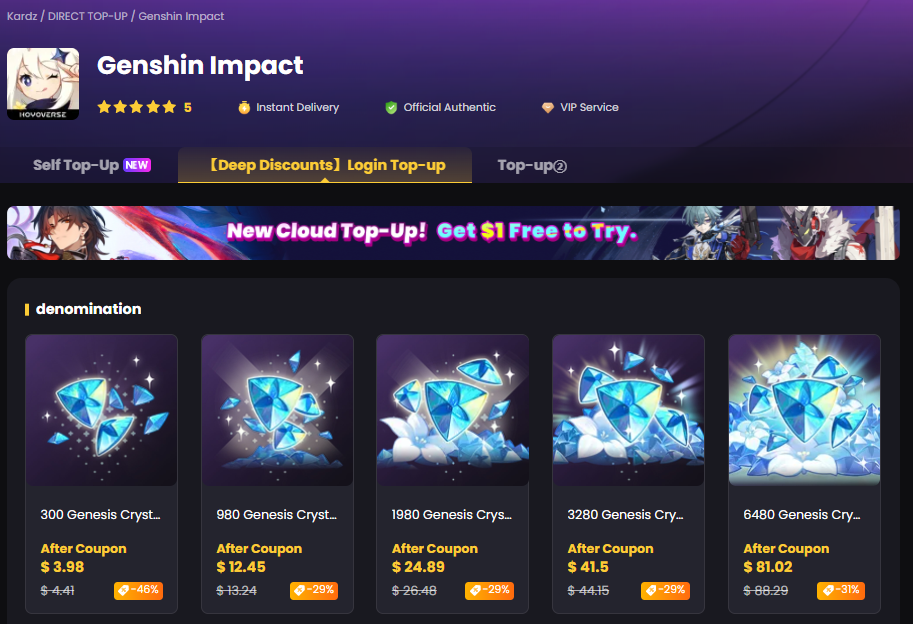
Pack sizes: 60 / 300 / 980 / 1,980 / 3,280 / 6,480 Genesis Crystals. Each size corresponds to the same number of Primogems after conversion.
There's also the Welkin Moon (monthly subscription, 90 Primogems/day for 30 days plus 300 Genesis Crystals upfront) and the Battle Pass (Gnostic Hymn gives 680 Primogems and other rewards over the patch). Not sure if Welkin Moon is worth it for your playstyle? We break it down fully in Genshin Welkin Moon 2026: Is It Worth It and Where to Buy Cheapest.
These are separate from Genesis Crystal packs but available on the same Kardz Genshin Impact page.
Step 1: Find Your UID
Your UID is your account's unique identifier. You need it for any top-up that doesn't go through the in-game store.
How to find it:
Open Genshin Impact
Tap the menu button in the bottom-right corner of the main screen
Your UID is displayed at the bottom of the screen
It's a 9-digit number. Copy-paste it rather than typing it manually — one wrong digit sends your crystals to the wrong account.
Step 2: Identify Your Server
This is where most failed top-ups happen. Genshin Impact has two separate server groups and you must select the correct one when placing your order.
The first digit of your UID tells you which server you're on:
| First digit | Server |
|---|---|
| 6 | Americas (NA) |
| 7 | Europe |
| 8 | Asia |
| 9 | HK / TW / MO |
You can also verify in-game: Settings → Account → the server name is listed there.
If you select the wrong server on Kardz, your crystals will fail to deliver or credit the wrong account. Always verify before paying. This is also covered in our Kardz vs Official Store comparison under common mistakes.
Step 3: Choose Your Pack
Go to the Kardz Genshin Impact page and select your pack size.
How many pulls each pack gets you:
| Pack | Primogems | Approx. Pulls |
|---|---|---|
| 300 Genesis Crystals | 300 | ~1 pull |
| 980 Genesis Crystals | 980 | ~6 pulls |
| 1,980 Genesis Crystals | 1,980 | ~12 pulls |
| 3,280 Genesis Crystals | 3,280 | ~20 pulls |
| 6,480 Genesis Crystals | 6,480 | ~40 pulls |
If your account still has the Initial Top-Up Bonus available at your chosen tier, you get double Genesis Crystals on that purchase — so 980 becomes 1,960, roughly doubling your pull count. This is explained in detail in our Genshin Impact Top Up Guide.
Step 4: Self Top-Up or Login Top-Up?
Kardz offers two methods. Understanding the difference saves you time and avoids surprises.
Self Top-Up (Recommended)
Enter your UID and server at checkout. No password needed. Crystals arrive in 1–3 minutes through official channels. This is the default option for most players on Global, Asia, Europe, and HK/TW servers.
Login Top-Up
You provide your account email and password to Kardz support, who complete the top-up manually. Takes around 15 minutes. Use this if Self Top-Up isn't available for your specific region or pack type.
For a full breakdown of both methods and how they compare to buying direct from HoYoverse, see Where to Buy Genshin Genesis Crystals: Kardz vs Official Store.
Step 5: Pay and Wait
Kardz accepts Visa, MasterCard, PayPal, Apple Pay, Google Pay, and a range of regional payment methods depending on your location.
After paying:
If you chose Self Top-Up: Don't close the browser until you see order confirmation. Crystals arrive in 1–3 minutes. Open Genshin and check your currency balance or in-game mail.
If you chose Login Top-Up: Stay completely logged out of Genshin on all devices until Kardz support notifies you. Logging in during processing can interrupt the order and delay delivery.
Step 6: Convert Genesis Crystals to Primogems
Genesis Crystals don't automatically become Primogems — you need to exchange them inside the game.
Open Genshin Impact
Go to Shop (Paimon menu, top left)
Tap Genesis Crystals
Select "Exchange for Primogems"
Choose the amount and confirm
The exchange is 1:1 and instant. Once converted, Primogems can be used to purchase Intertwined or Acquaint Fates from the same shop.
Step 7 (Login Top-Up only): Change Your Password
If you used Login Top-Up, go to your HoYoverse account settings and update your password as soon as the top-up is confirmed. Your credentials were temporarily held by Kardz support during the process — changing them immediately afterward is the simplest way to secure your account.
Troubleshooting: What to Do If Crystals Don't Arrive
Self Top-Up didn't deliver within 5 minutes:
Confirm your order shows as completed in your Kardz account dashboard
Restart Genshin Impact completely and recheck your currency balance
If nothing after 10 minutes, contact Kardz support with your order number — 24/7 support is available
Login Top-Up taking longer than 15 minutes:
Make sure you're fully logged out of Genshin on every device — being online blocks the process
Check if Kardz support has sent a message asking for a verification code (common with Google accounts)
Contact support directly if you haven't heard anything after 20 minutes
Crystals went to the wrong account:
This happens when the wrong server is selected at checkout
Contact Kardz support immediately with your order number and correct UID
This is why verifying your server before paying is the most important step in the whole process
Payment failed:
Try a different payment method or clear your browser cache and retry
Some regional cards require enabling international transactions — check with your bank if a card is being declined
Frequently Asked Questions
Do I get the Initial Top-Up Bonus when buying through Kardz?
Yes. The double bonus is tied to your HoYoverse account's purchase history, not which platform you buy from. If your account qualifies for the bonus at a given tier, you receive it whether you buy through HoYoverse or Kardz.
Can console players (PS5 / Xbox) top up on Kardz?
Yes, as long as your Genshin account has a UID and is on a supported server. Kardz works for console players who have a linked HoYoverse account.
Is it safe to top up through Kardz?
Self Top-Up uses your UID only — no account access involved. For Login Top-Up, Kardz has processed millions of orders since 2008. Change your password after Login Top-Up as standard practice. For a longer answer on platform safety, see our Kardz vs Official Store guide.
How do I know if my Initial Top-Up Bonus is still available?
In-game, go to Shop → Genesis Crystals. Each pack that still has the double bonus available will show a "×2" indicator. If you don't see it, that tier has already been used.
Can I buy multiple Welkin Moons at once?
Yes — purchasing a second Welkin Moon while one is active queues it to start after the first expires. The 300 Genesis Crystals from each purchase land immediately. Full details in our Welkin Moon guide.
Related Guides
Genshin Impact Top Up Guide 2026: Cheapest & Safest Way to Buy Genesis Crystals
Where to Buy Genshin Genesis Crystals: Kardz vs Official Store

-2a715a59b9ac4d34bbed497d36983382.png?x-oss-process=image/resize,m_fill,h_160,w_120/format,webp)








-9a889cb91d394019b4e9a2463137b396.png?x-oss-process=image/resize,m_fill,h_160,w_120/format,webp)