

 DIRECT TOP-UP

 CARD
CARDTFT Mobile Gold Top-up Guide for Set 18: Enchanted Wilds

TFT Set 18: Enchanted Wilds has arrived, bringing a new world of champions, traits, mechanics, and cosmetic content to Teamfight Tactics players. For mobile players looking to customize their experience, understanding how TFT Mobile Gold Top-up works can make it easier to access premium content and in-game items.
Teamfight Tactics continues to support gameplay across PC and mobile, allowing players to access their TFT experience across supported platforms with the same Riot Account. Riot's official TFT information confirms that player inventories and progression can be shared between PC and mobile.
With the arrival of Set 18: Enchanted Wilds, now is a good time to review the basics of TFT Mobile top-ups and the difference between in-game Gold and purchasable TFT currency.
What Is TFT Mobile Gold Top-up?
When players search for TFT Mobile Gold Top-up, they may use “Gold” as a general term for TFT's in-game currency or premium currency.
However, these are different systems.
The Gold used during TFT matches is part of the gameplay economy. Players earn and spend it during a match to purchase champions, reroll the shop, or gain experience.
A TFT Mobile top-up, on the other hand, is used to purchase premium content and other items available through the TFT store and related systems.
This distinction is important because purchasing premium currency does not simply add match Gold to your board. Instead, it allows players to access eligible cosmetic and progression-related content through TFT's monetization system.
Why Are Players Looking for TFT Mobile Top-up?
The launch of a new TFT set often brings renewed interest in the game.
Riot's current Set 18: Enchanted Wilds introduces a new thematic environment and gameplay systems, giving players a reason to return to TFT and explore the latest content.
For mobile players, a top-up can be useful when they want to purchase premium content such as:
Little Legends and Tactician-related content
Arena cosmetics
Pass-related content
Featured offers
Other limited or premium content available through TFT
Players should always check the available items and pricing for their own region before purchasing because mobile storefront pricing and available purchase options can vary.
TFT Mobile Gold vs. TFT Premium Currency
One of the most common sources of confusion is the word “Gold.”
In a normal TFT match, Gold is part of the game economy. Players use it to make strategic decisions during gameplay.
For example, Gold can be used to:
Purchase champions from the shop
Refresh the champion shop
Purchase experience
Build an economy for later rounds
This Gold is earned during gameplay and is not normally purchased through a top-up service.
By contrast, players searching for TFT Mobile Gold Top-up are often looking for a way to purchase premium TFT currency or content.
Understanding this difference helps players choose the correct top-up product and avoid ordering the wrong service.
How to Top Up TFT Mobile
Before placing a TFT Mobile top-up order, make sure you know which region and account you are using.
The general process is:
1. Open the TFT Mobile Top-up Page
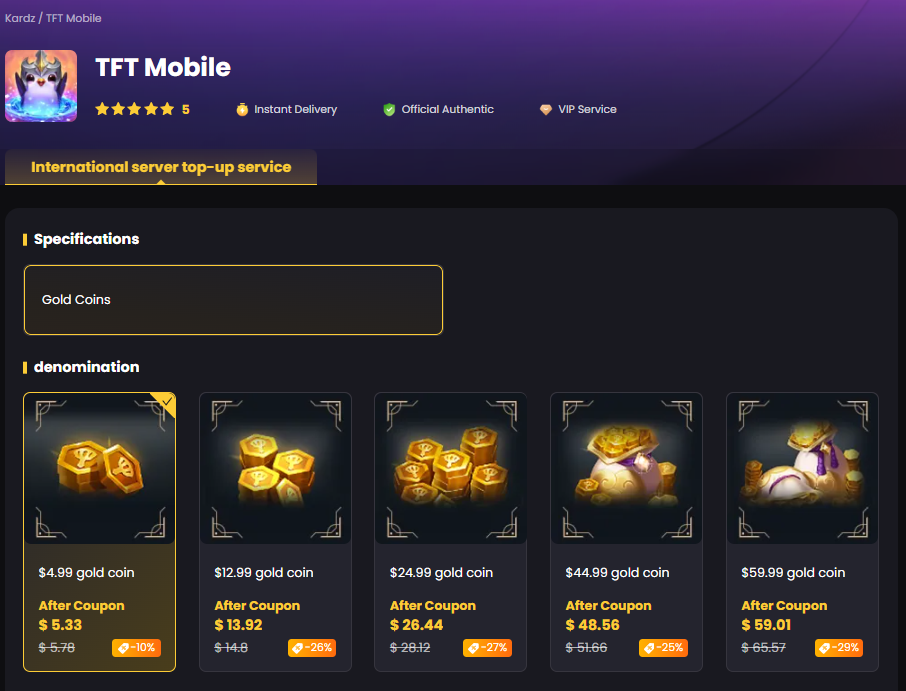
Visit the TFT Mobile top-up page on a trusted platform and check the available products.
For Kardz users, the dedicated TFT page provides the available top-up options for Teamfight Tactics.
2. Select the Correct Package
Choose the package that matches the amount of premium currency or content you want to purchase.
Avoid selecting a package only because its denomination looks similar to another game. TFT and other Riot titles can use different purchasing systems.
3. Verify Your Account Information
Before completing the order, carefully check the account or player information required for the selected top-up method.
Incorrect account information can delay a recharge or result in the purchase being applied to the wrong account.
4. Complete Payment
Choose one of the available payment methods and complete the transaction.
Kardz supports multiple payment methods for overseas game top-ups and states that most direct top-ups are completed within a few minutes, although processing time can vary by product and traffic conditions.
5. Return to TFT Mobile
After the top-up has been completed, reopen or re-enter TFT Mobile and check the relevant account balance or purchased content.
What Can TFT Mobile Top-up Be Used For?
A TFT Mobile top-up is generally more useful for cosmetic and premium content than for the Gold economy used inside individual matches.
Depending on the current store and region, players may use purchased currency or eligible payment methods for content such as:
Little Legends
Little Legends are one of the most recognizable cosmetic features in TFT. They allow players to personalize their in-game presence.
Arenas
Arena cosmetics change the visual presentation of the battlefield and are popular among players who want a more customized TFT experience.
Pass Content
TFT regularly offers progression-based pass systems with free and premium rewards. Players interested in completing a new set's content may choose to purchase the premium portion when available.
Limited-Time Offers
New sets and events can introduce temporary or featured offers. Players who are interested in a particular cosmetic item should check its availability before purchasing.
TFT Mobile Top-up and Set 18: Enchanted Wilds
The arrival of Enchanted Wilds gives TFT Mobile players a fresh reason to explore the latest set.
Riot describes Set 18 as a world filled with wild magic, new champions, traits, and the new Wisps mechanic. The set officially launched in August 2026.
The new set also comes during a period of continued TFT mobile development. Riot has continued updating the mobile version alongside the desktop game. Recent TFT updates have included changes to mobile minimum device requirements as well as ongoing balance and gameplay updates.
For players returning to TFT after a break, this means a top-up is best considered as part of exploring the new set's available cosmetic and premium content rather than as a way to gain gameplay Gold.
Tips for a Safe TFT Mobile Top-up
Before purchasing a TFT Mobile Gold Top-up, keep these points in mind.
Check the Server or Region
TFT purchasing options can vary according to region. Make sure the product you select matches your account.
Double-Check Your Account
Carefully review your Riot ID, player information, or other details required during checkout.
Understand the Currency
Do not confuse TFT match Gold with premium TFT currency. If your goal is to purchase cosmetic content, make sure you are buying the correct currency or product.
Keep Your Account Secure
Never provide unnecessary credentials or verification information to an unofficial seller. Use a trusted payment platform and follow the account-safety instructions provided during checkout.
Start Your TFT Mobile Top-up
Whether you are returning for TFT Set 18: Enchanted Wilds or simply looking to unlock new cosmetic content, choosing the correct TFT Mobile top-up product can make the process much easier.
For players searching for a reliable TFT Mobile Gold Top-up, Kardz provides a dedicated Teamfight Tactics top-up page where players can check available options and complete their purchase.
Ready to top up TFT Mobile?
Visit the TFT Mobile Top-up page and check the available options for your account.


.3889d0fc-74ac50710b044340bd44dab8a52423fc-3586d75109ce407d9e379eb27e699030.png?x-oss-process=image/resize,m_fill,h_160,w_120/format,webp)





-2a715a59b9ac4d34bbed497d36983382.png?x-oss-process=image/resize,m_fill,h_160,w_120/format,webp)